> ## Documentation Index
> Fetch the complete documentation index at: https://docs.deflect.in/llms.txt
> Use this file to discover all available pages before exploring further.
# Agent file attachments
> Send files from the dashboard to customers in chat, email, or WhatsApp
When a customer needs a document, screenshot, or invoice, your team can **attach files** directly from the dashboard while replying in live chat or on a ticket. Files are checked for type and safety before they are delivered.
## Where you can attach files
| Place | How to attach |
| ------------- | -------------------------------------------------------- |
| **Live chat** | Paperclip icon in the message composer |
| **Tickets** | Same attachment control when replying on a ticket thread |
Attachments work on channels your plan supports — typically **web chat**, **email**, and **WhatsApp** when those channels are connected.
 ## What customers receive
How the file appears depends on the channel:
| Channel | Typical experience |
| ------------ | --------------------------------------------------------------------------------------------------------- |
| **Web chat** | File appears in the thread like a chat attachment; images often show inline |
| **Email** | Images may preview inline; documents may appear as downloads or secure links depending on the mail client |
| **WhatsApp** | Images and documents arrive as native WhatsApp media when supported |
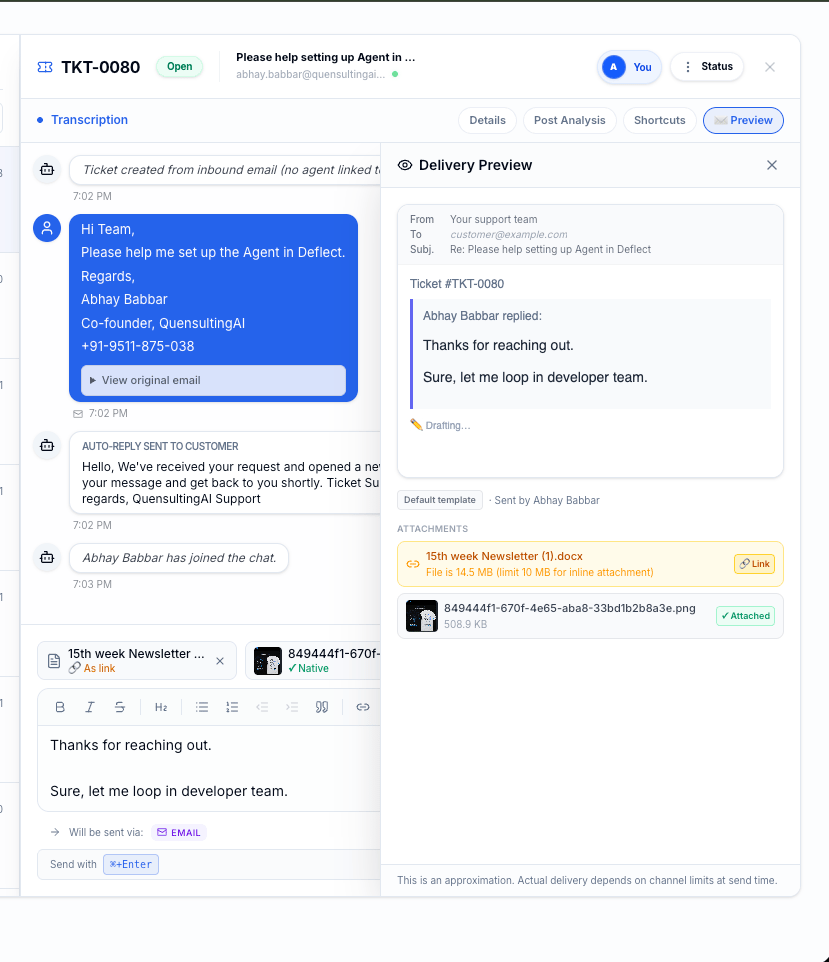
Before you send, the dashboard may show a **delivery preview** per channel (inline attachment vs. download link).
## What customers receive
How the file appears depends on the channel:
| Channel | Typical experience |
| ------------ | --------------------------------------------------------------------------------------------------------- |
| **Web chat** | File appears in the thread like a chat attachment; images often show inline |
| **Email** | Images may preview inline; documents may appear as downloads or secure links depending on the mail client |
| **WhatsApp** | Images and documents arrive as native WhatsApp media when supported |
Before you send, the dashboard may show a **delivery preview** per channel (inline attachment vs. download link).
 ## Supported file types
Deflect accepts common business formats, including:
* **Images** — JPEG, PNG, WebP, GIF
* **Documents** — PDF, Word (.docx), Excel (.xlsx), PowerPoint (.pptx)
* **Text** — Plain text (.txt), CSV (.csv)
Other formats are rejected with a clear message in the dashboard so you can choose a supported alternative.
## Size limits
Maximum file size depends on your **plan** (shown in billing limits). If an upload fails for size, try compressing the file or sharing a link in your message instead.
**File attachments require a paid plan** that includes attachment support. On the Free plan, attachment uploads are not available. Upgrade from **Settings → Billing** if uploads are disabled.
## Safety checks
Every upload is validated before delivery:
* File type is verified — renamed extensions that do not match the actual file are blocked.
* Files are scanned for malware. Infected files are rejected and never sent to customers.
If a file is blocked, you will see an error on the attachment chip. Remove it and try a different file.
## Inline images in email replies
When composing an **email** reply, you can also insert images **inline** in the message body (separate from the paperclip attachments). Use this for screenshots or diagrams inside the email text.
## Tips for agents
* Prefer PDF for formal documents; PNG or JPEG for screenshots.
* Wait until the attachment chip shows **Ready** before sending.
* If WhatsApp shows a link instead of inline media, the file type or size may require link delivery — that is normal.
* Do not send sensitive data unless your policies allow it; attachments follow the same retention rules as the conversation.
## Related guides
* [Live chat](/live-chat) — where agents reply in real time.
* [Tickets](/tickets) — attach files on ticket threads.
* [WhatsApp integration](/whatsapp-integration) — WhatsApp-specific delivery behavior.
* [Settings & billing](/settings) — plan limits for attachments.
## Supported file types
Deflect accepts common business formats, including:
* **Images** — JPEG, PNG, WebP, GIF
* **Documents** — PDF, Word (.docx), Excel (.xlsx), PowerPoint (.pptx)
* **Text** — Plain text (.txt), CSV (.csv)
Other formats are rejected with a clear message in the dashboard so you can choose a supported alternative.
## Size limits
Maximum file size depends on your **plan** (shown in billing limits). If an upload fails for size, try compressing the file or sharing a link in your message instead.
**File attachments require a paid plan** that includes attachment support. On the Free plan, attachment uploads are not available. Upgrade from **Settings → Billing** if uploads are disabled.
## Safety checks
Every upload is validated before delivery:
* File type is verified — renamed extensions that do not match the actual file are blocked.
* Files are scanned for malware. Infected files are rejected and never sent to customers.
If a file is blocked, you will see an error on the attachment chip. Remove it and try a different file.
## Inline images in email replies
When composing an **email** reply, you can also insert images **inline** in the message body (separate from the paperclip attachments). Use this for screenshots or diagrams inside the email text.
## Tips for agents
* Prefer PDF for formal documents; PNG or JPEG for screenshots.
* Wait until the attachment chip shows **Ready** before sending.
* If WhatsApp shows a link instead of inline media, the file type or size may require link delivery — that is normal.
* Do not send sensitive data unless your policies allow it; attachments follow the same retention rules as the conversation.
## Related guides
* [Live chat](/live-chat) — where agents reply in real time.
* [Tickets](/tickets) — attach files on ticket threads.
* [WhatsApp integration](/whatsapp-integration) — WhatsApp-specific delivery behavior.
* [Settings & billing](/settings) — plan limits for attachments.