

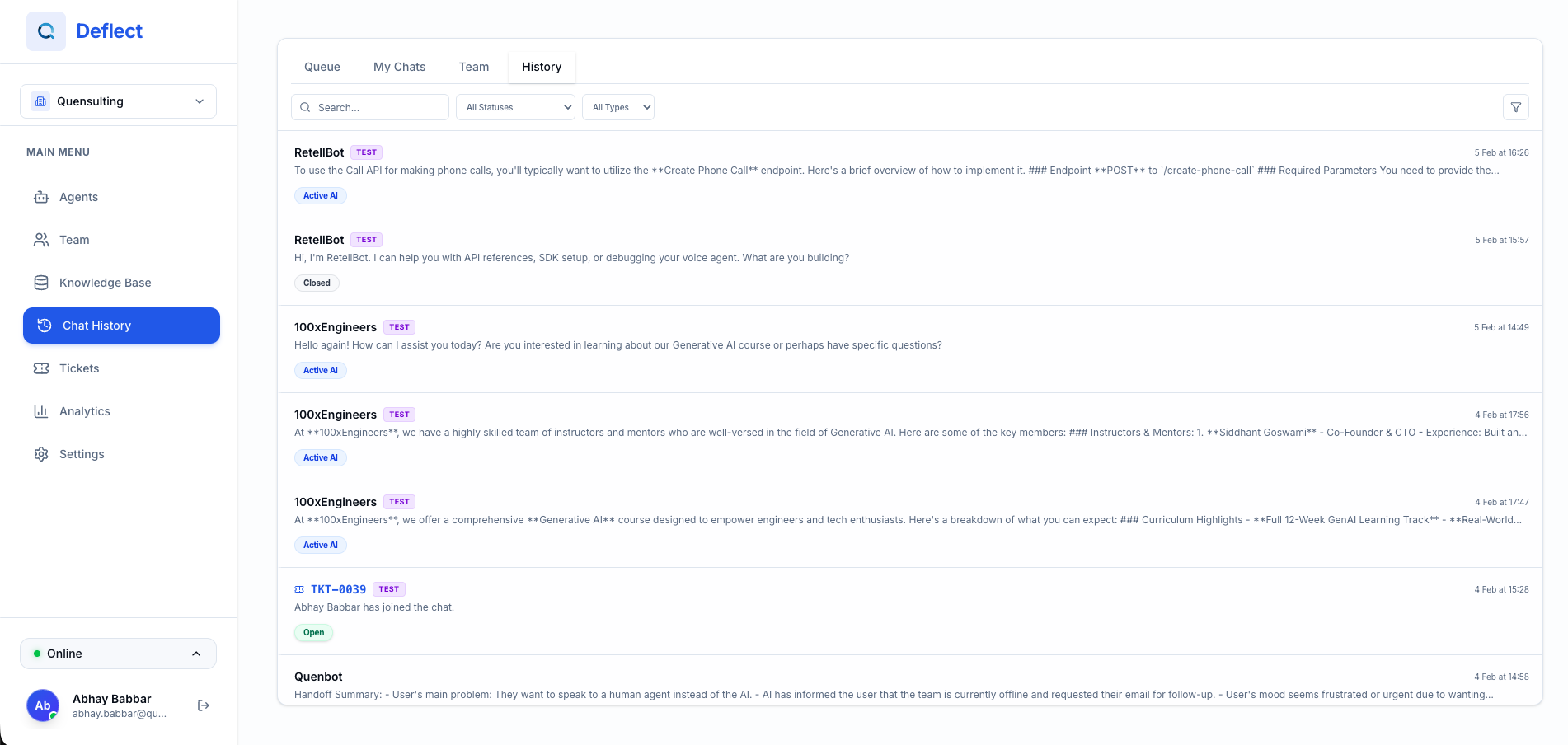
Viewing Conversations
Navigate to History from the sidebar. You’ll see a list of all conversations with:- Status — Active (AI), Waiting for Human, Active (Human), Awaiting Offline Info, or Closed.
- Chatbot — Which agent handled the conversation.
- Last Message — A preview of the most recent message.
- Date — When the conversation started or was last updated.
- Assigned Agent — The human agent assigned (if any).
Search & Filters
Use the controls at the top of the page to find specific conversations:Search
Type a keyword in the search bar to find conversations containing specific text.Filters
- Status — Filter by conversation status (Active, Waiting, Closed).
- Agent — Show only conversations assigned to a specific team member.
- Chatbot — Filter by which chatbot handled the conversation.
- Date Range — Use the date picker to narrow results to a specific time period.
Tabs
The page has tabs to quickly switch between conversation types:- All — Every conversation.
- Active — Conversations currently in progress (AI or human).
- Waiting — Conversations waiting for a human agent.
- Closed — Ended conversations.
Assigning Conversations
You can assign a conversation to yourself directly from the list:- Find the conversation.
- Click Assign to me.
- The conversation will appear in your assigned queue.
You can also assign conversations to other team members from within the Live Chat Panel. See Live Chat for details.