Post-Chat Analysis uses AI to automatically analyze conversations after they end. It can extract structured data, summarize the conversation, and assess customer sentiment — giving you actionable insights without manual review.

How It Works

  1. A conversation ends (closed by an agent or auto-closed).
  2. The AI analyzes the full conversation.
  3. It generates:
    • Summary — A concise overview of what was discussed.
    • Sentiment — The customer’s overall mood (Positive, Neutral, Negative).
    • Extracted Data — Custom fields you define (see below).

Viewing Analysis Results

  1. Open any completed conversation from the Chat History page.
  2. In the Live Chat Panel, click the Analysis tab.
  3. View the AI-generated summary, sentiment, and any extracted fields.
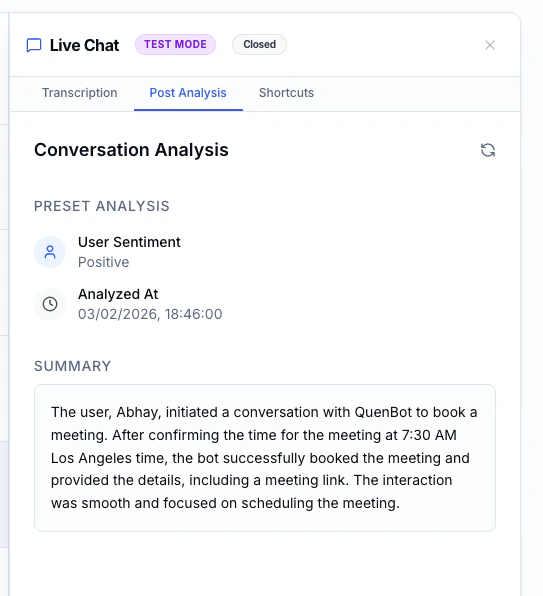
Post-chat analysis tab showing conversation summary, sentiment, and extracted data

Configuring Analysis Fields

You can define custom fields that the AI will extract from each conversation. This is configured per agent.

Adding a Field

  1. Open the Agent Editor for your chatbot.
  2. Scroll to the Post-Chat Analysis section.
  3. Click Add Field.
  4. Configure the field:
SettingDescription
KeyA unique identifier (e.g., issue_category)
Typetext, number, boolean, or enum
DescriptionInstructions for the AI on what to extract (e.g., “The main category of the user’s issue”)
OptionsFor enum type only — list of allowed values (e.g., “Billing, Technical, General”)

Example Fields

KeyTypeDescription
issue_categoryenumMain category: Billing, Technical, General, Feature Request
resolvedbooleanWhether the user’s issue was fully resolved
product_mentionedtextThe specific product or feature the user asked about
satisfaction_scorenumberEstimated satisfaction from 1-10 based on conversation tone
Well-written descriptions help the AI extract more accurate data. Be specific about what you want it to look for.

Editing & Removing Fields

  • Click on a field to edit its configuration.
  • Click the delete icon to remove a field.
Changes to analysis fields apply to future conversations only. Previously analyzed conversations retain their original extracted data.